The internet is definitely not lacking in education web 2.0 tools that could be used in many classrooms. As I was browsing the web looking for any blogs on technology and education, I stumbled upon this great article, "The 100 Best Web 2.0 Classroom Tools Chosen By You" on the website Edudemic. One tool that really appealed to me as a future English teacher was Penzu. It's a private and secure online journal that I could have my students sign up and do some free writes on. Not only that though, there is also the Penzu Classroom app that teachers can use to manage students, create assignments, grade, and more. It looks like a very versatile app that I could easily see in an English language arts classroom.
Another web 2.0 tool that is very popular but I wish I saw more use of it in classrooms, is Skype. This awesome technology can be a great way to bring guest speakers into your classroom without having to travel. I am also a huge proponent of using Skype to collaborate with other classrooms in different countries. It's an excellent way to expose students to new cultures and ways of life, which is incredibly valuable and enriches critical thinking skills.
Also during my internet perusing, I came across this very useful aggregator, Spigot. It aggregates everything "at the intersection of learning, technology, and youth," from news, research, opinions, and info. For instance, under "research" I found a great little blog entry about the importance of Taking Risks by Steve Wheeler. I honestly could have spent hours upon hours on Spigot, and I already have it bookmarked for further investigation =)
Friday, May 16, 2014

The Many Uses of Google Drive
I myself only found out about Google Drive last semester, but man am I thankful that I did. Google Drive is a very versatile tool. With it, you can create documents, spreadsheets, and even slideshows, and the best part is that everything saves automatically and right to Google, so all of your stuff is accessible from any computer. This has saved me a couple times in the past.
I most certainly see myself incorporating Google Drive into my future classroom. I even got observe how effective it can be in the classroom during my field experience at Hellgate Elementary this semester. I worked with a very technologically progressive 5th grade class on writing realistic fiction stories, and each student had their own Ipad which they used to write their stories on Google Drive. This was awesome because I could work with the students on the stories right there in class and not have to worry about going to the computer lab or anything. They could also all share them with the teacher so that she can monitor their progress any time and help them with any questions from home.
An example of a lesson plan that I could create for a high school English class that utilizes Google Drive could be along these lines:
Let's imagine that my students will be reading John Steinbeck's Grapes of Wrath in class. As a possible introductory activity, I could have my students work collaboratively in groups of two or three to research the Great Depression, John Steinbeck, and/or the 1930's, and then, using Google Presentation, create a slideshow presentation. I would let the students work together on it in the classroom for only a little bit, just enough to brainstorm ideas, but then I would want them to practice their online collaboration skills by creating the actual presentation from their respective homes.
Then, as my students worked through the novel, I could use Google Documents to create chapter quizzes that my students could do from home. Not only would this save time, it would also eliminate a lot of paper waste.
I most certainly see myself incorporating Google Drive into my future classroom. I even got observe how effective it can be in the classroom during my field experience at Hellgate Elementary this semester. I worked with a very technologically progressive 5th grade class on writing realistic fiction stories, and each student had their own Ipad which they used to write their stories on Google Drive. This was awesome because I could work with the students on the stories right there in class and not have to worry about going to the computer lab or anything. They could also all share them with the teacher so that she can monitor their progress any time and help them with any questions from home.
An example of a lesson plan that I could create for a high school English class that utilizes Google Drive could be along these lines:
Let's imagine that my students will be reading John Steinbeck's Grapes of Wrath in class. As a possible introductory activity, I could have my students work collaboratively in groups of two or three to research the Great Depression, John Steinbeck, and/or the 1930's, and then, using Google Presentation, create a slideshow presentation. I would let the students work together on it in the classroom for only a little bit, just enough to brainstorm ideas, but then I would want them to practice their online collaboration skills by creating the actual presentation from their respective homes.
Then, as my students worked through the novel, I could use Google Documents to create chapter quizzes that my students could do from home. Not only would this save time, it would also eliminate a lot of paper waste.
Wednesday, April 16, 2014
Educational Potentials of RSS Aggregators
My professor in Integrating Technology into Education recently introduced us to RSS aggregators. I had never heard of these before, but I'm glad that he exposed me to them because I can see plenty of possible uses for one in my future classroom.
After learning about RSS aggregators I decided to create a mock setup to see how exactly it could be beneficial in my classroom. The image below is a screen shot of what I created.

After learning about RSS aggregators I decided to create a mock setup to see how exactly it could be beneficial in my classroom. The image below is a screen shot of what I created.
Because this was only an experimental layout, I didn't get too in-depth with it, but needless to say, what I found so far was very intriguing. For those unfamiliar with RSS feeds, what they basically do, in layman's terms, is they filter whatever topic you want to search off of the entire internet and pulls all of it into one spot -your page- for you. Teachers could really use these feeds in two ways. They could create a page that the entire class has access to, or they could teach the students how to effectively use one for themselves. For my mock layout I decided to go with the former.
If you look towards the top of my page you will see that I have three different tabs set up, one for literature, one for Shakespeare, and one for writing help. These were three topics that I decided to follow as an experiment for use in an English language arts classroom. I figured that it would be helpful to have a few relative tabs, like "literature" and "writing help," that the students could make use of no matter what time of the year. This way, if my students had a concern in relation to their writing, they could get on our "writing help" page and see if they could find any help with their question. The great thing about these aggregators is that you can search whatever topic you want and find a whole bunch of relative apps that you can throw on your page. For example, on my "writing help" page, I searched for things like "grammar" and "writing essays," and I found some great apps, such as Grammar Girl's podcast and PowerPapers Academic Writing Blog. You can also link whole websites to your page, so I threw on www.dictionary.com and www.thesaurus.com.
While I was creating these tabs for my students everyday use I started to think about the other types of topics that could be feeds for them, and it hit me that this could be a great source for students to find information on books that we may be reading in class at the time. This image displayed on my screenshot is of a quick tab I set up on Shakespeare. I found some really awesome apps where people read Shakespeare's sonnets and even his plays aloud-- not to mention all of the blogs, news articles, and Google searches that filter in.
All in all, I can see a lot of potential with using an aggregator in the classroom. I just need to spend a lot more time with it and keep exploring all of its functions and possibilities. I do have one concern however, and that's about inappropriate material being filtered in. I haven't encountered this yet, but I need to further investigate the security and parental control aspects of these sites before I ever incorporate one.
Saturday, April 5, 2014
Future Use of Sources in the Classroom: A Study of Copyright, Fair Use, and Creative Commons
In the digital era of today, legal issues involving copyright and creative ownership are more prevalent than ever before. With the profusion of accessible resources via the internet, it's wise to have at least a moderate understanding of the rules and regulations involved with copyright and fair use. This is especially true for teachers and students. I will readily admit that it's not the most captivating subject--in fact, it's rather convoluted and a bit dry. However, as a future teacher, it's important that I begin to familiarize myself with copyright law so that I can better protect myself as well as my students.
From what I have begun to learn about copyright and fair use, I, for the most part, agree with most aspects of it. What I really appreciate about copyright law is its effort to find balance. Of course creators should have the right control compensation and use of their work, but I am also a very strong proponent of public accessibility and the right to re-use something in new and creative ways as a means to express or educate. This is especially important to me because as a prospective English language arts teacher, there will undoubtedly be an abundance of resources used within my classroom, by both myself and my students. While I will certainly encourage my students to create original works and ideas, I also believe that re-envisioning or re-using somebody else's work in a new and creative way is not without its merits; not only does it still foster creativity, it also promotes critical thinking by encouraging students to look at things under multiple lenses.
This is where fair use and Creative Commons comes into play. Fair use is an exception to the copyright law that allows limited use of copyrighted material, without permission, based on four factors. As educators it's important that we study these factors and introduce them to our students so they can begin to understand and see the demarcation of their rights to re-use. Another wonderful way to get students thinking about copyright law and their use of sources, is to introduce them to Creative Commons and even have them licence one of their own projects with a CC license. Creative Commons is an awesome concept that allows free use works and promotes idea sharing while still paying recognition to the original creators. Making students aware of Creative Commons licensing furthers their copyright understanding and safety by opening their eyes to a whole new world of usable resources.
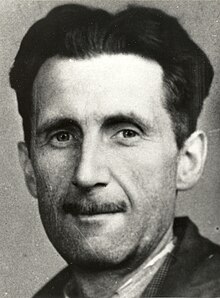
One thing that I am pondering about these issues of copyright and fair use, is how much I will realistically be able to teach my students about them. They are certainly important topics that need to be discussed, but how much time should be devoted to it? Our teacher introduced us to this great website that provides a curriculum for a unit on teaching copyright that looks like it could be fun, but it's composed of five 60 minute lesson plans, and I'm not sure that I could, nor should, spend five periods teaching it. I think I should definitely spend a little time with it and get them introduced to the basics as well as provide them with the materials to learn more about it on their own. I could also incorporate small activities into their assignments that get them thinking about copyright law. For instance, say we are reading the book 1984 by George Orwell. I could have the students find an image somewhere online that relates to the book in any way, and have them post it on the class blog with a brief statement defending its use and describing how they obtained it. As an example, I found this picture of George Orwell on Wikipedia and was able to use it because all images on Wikipedia are public domain and copyright free. This is just one idea to get students thinking about their sources and how they obtain them.

From what I have begun to learn about copyright and fair use, I, for the most part, agree with most aspects of it. What I really appreciate about copyright law is its effort to find balance. Of course creators should have the right control compensation and use of their work, but I am also a very strong proponent of public accessibility and the right to re-use something in new and creative ways as a means to express or educate. This is especially important to me because as a prospective English language arts teacher, there will undoubtedly be an abundance of resources used within my classroom, by both myself and my students. While I will certainly encourage my students to create original works and ideas, I also believe that re-envisioning or re-using somebody else's work in a new and creative way is not without its merits; not only does it still foster creativity, it also promotes critical thinking by encouraging students to look at things under multiple lenses.
This is where fair use and Creative Commons comes into play. Fair use is an exception to the copyright law that allows limited use of copyrighted material, without permission, based on four factors. As educators it's important that we study these factors and introduce them to our students so they can begin to understand and see the demarcation of their rights to re-use. Another wonderful way to get students thinking about copyright law and their use of sources, is to introduce them to Creative Commons and even have them licence one of their own projects with a CC license. Creative Commons is an awesome concept that allows free use works and promotes idea sharing while still paying recognition to the original creators. Making students aware of Creative Commons licensing furthers their copyright understanding and safety by opening their eyes to a whole new world of usable resources.
One thing that I am pondering about these issues of copyright and fair use, is how much I will realistically be able to teach my students about them. They are certainly important topics that need to be discussed, but how much time should be devoted to it? Our teacher introduced us to this great website that provides a curriculum for a unit on teaching copyright that looks like it could be fun, but it's composed of five 60 minute lesson plans, and I'm not sure that I could, nor should, spend five periods teaching it. I think I should definitely spend a little time with it and get them introduced to the basics as well as provide them with the materials to learn more about it on their own. I could also incorporate small activities into their assignments that get them thinking about copyright law. For instance, say we are reading the book 1984 by George Orwell. I could have the students find an image somewhere online that relates to the book in any way, and have them post it on the class blog with a brief statement defending its use and describing how they obtained it. As an example, I found this picture of George Orwell on Wikipedia and was able to use it because all images on Wikipedia are public domain and copyright free. This is just one idea to get students thinking about their sources and how they obtain them.
Sunday, March 23, 2014
Practice Making a Pecha Kucha
Recently in my Tech. class we learned about these brief presentations called "Pecha Kuchas." I found the concept a bit intriguing and thought I would attempt to make one of my own to see if I they could be of use in my future classroom.
Technologically speaking, creating Pecha Kuchas isn't extremely hard or anything, but it is a bit time consuming. I don't consider myself technologically skilled by any means, but neither am I technologically incompetent, and I was able to use the technology needed to create a Pecha Kucha rather easily. The only real skills needed to make one of these presentations are a basic knowledge in creating slideshows, an understanding of how to find loyalty-free images, and some experience with screen casting software. The latter of these skills was the only thing that I really had to learn, and it was not too difficult. The biggest problem I had with creating my presentation was with the actual recording of my discourse. I don't know how many times I got to the very ending of my slides and would mess up and have to start completely over. That was honestly the only really difficult part of the experience.
Over all, I think Pecha Kuchas are very relevant in the 21st Century and have a lot of educational potential. They would be a great way to provide guidance to students when presenting new information on a subject. For example, the Pecha Kucha I created (seen below) is a brief overview of the major literary time periods. An English teacher could present something like this to their students at the beginning of the school year as a prelude into the literary time periods they might be exploring that year. Or, say my students are going to be reading Lord of the Flies in class. I could create a Pecha Kucha that gives the students a brief overview of the novel, the author, and the themes and symbols they should be looking for when reading. I think these presentations are very effective because the images, when used correctly, can really add emotion to the information and make retention much more likely.
Technologically speaking, creating Pecha Kuchas isn't extremely hard or anything, but it is a bit time consuming. I don't consider myself technologically skilled by any means, but neither am I technologically incompetent, and I was able to use the technology needed to create a Pecha Kucha rather easily. The only real skills needed to make one of these presentations are a basic knowledge in creating slideshows, an understanding of how to find loyalty-free images, and some experience with screen casting software. The latter of these skills was the only thing that I really had to learn, and it was not too difficult. The biggest problem I had with creating my presentation was with the actual recording of my discourse. I don't know how many times I got to the very ending of my slides and would mess up and have to start completely over. That was honestly the only really difficult part of the experience.
Over all, I think Pecha Kuchas are very relevant in the 21st Century and have a lot of educational potential. They would be a great way to provide guidance to students when presenting new information on a subject. For example, the Pecha Kucha I created (seen below) is a brief overview of the major literary time periods. An English teacher could present something like this to their students at the beginning of the school year as a prelude into the literary time periods they might be exploring that year. Or, say my students are going to be reading Lord of the Flies in class. I could create a Pecha Kucha that gives the students a brief overview of the novel, the author, and the themes and symbols they should be looking for when reading. I think these presentations are very effective because the images, when used correctly, can really add emotion to the information and make retention much more likely.
Wednesday, February 26, 2014
Tuesday, February 25, 2014
Free Technology for Teachers
So, I just spent some time perusing this wonderful little blog called Free Technology for Teachers, and I found a couple of tools that may be very useful for a future English language arts teacher such as myself. The first thing I found is a site, Toasted Cheese, that offers a monthly calendar of daily writing prompts. If I attain my own class in the future, I definitely intend to have my students begin each day with a quick free write - it's an awesome way to get the brain warmed up and ready to go. While I don't see myself using this site everyday (because that takes the fun out of creating your own writing prompts), I think it would be great to have handy for the days I don't have a prompt ready, or when I'm not feeling super creative. Some of the prompts on their calendar look really fun!
The next great tool I found is this site, AirPano, that allows you to take 360 degree virtual tours of famous landmarks and cities throughout the world. This site - a lot like Google Earth, in a sense - is tons of fun and very easy to use. It's also very easy to burn a lot of time on their without even realizing it. I spent forever playing on there, checking out the places I've been to, like Athens, Greece (they have a great view of the Acropolis). This site would be fun to use in the classroom so that the students could take tours of the locations that they are reading about in their books, and get an actual visual of the scenery.
And finally, one last quick site that I found really neat, was this map called "Mapping the World of Mark Twain." The site is a map of every location that Mark Twain ever wrote about. It's a map of the world, and every location that Twain wrote about has a blue dot (there are tons of them) that you can click on, and it gives you the line of the text and the work it's from. You can also choose to read the entire passage. I don't know that I would ever really use this in a classroom, but it could definitely be something that you show to your students and let them mess around with.
Saturday, February 22, 2014
Monday, February 17, 2014
A Work Product for My Future Classroom
One work product that I could see myself implementing in my classroom would be a student-created, class blog. I think this would be a fun and creative way to get students engaged and to expose their work to an authentic audience. In the world of today, there is no better way to get students to experience an authentic audience than to have them share their work on the internet.
The class blog would be a place for students to share and reflect on what they have learned. The great thing about a class blog is its multifarious uses: students could use it as an open discussion forum, posing any questions or ideas on the subject material, and receive feedback from their peers, or even students throughout the world; students could upload their projects or essays to be shared and commented on; I could create assignments designed specifically around the blog. There really are plenty of creative ways (and reasons) to use a class blog.
The class blog would be a place for students to share and reflect on what they have learned. The great thing about a class blog is its multifarious uses: students could use it as an open discussion forum, posing any questions or ideas on the subject material, and receive feedback from their peers, or even students throughout the world; students could upload their projects or essays to be shared and commented on; I could create assignments designed specifically around the blog. There really are plenty of creative ways (and reasons) to use a class blog.
Wednesday, February 12, 2014
Some Valuable Links on Integrating Technology into the Classroom
I must admit that, as a prospective teacher and more of a traditionalist, the rapidly changing world of technology and its integration into the classroom has made me a bit anxious. However, over the past couple of semesters I have been learning a lot about the usefulness of technology in the classroom, and my obdurate resistance has begun to weaken.
My biggest concerns were with students wasting time on sites like Facebook and the such. As a student myself, I've witnessed first-hand just how distracting those types of things can be in class. I can't count the number of times I've seen students spend an entire lecture perusing Facebook. However, I've come to realize that this is only a minor concern and it can be controlled, for the most part, pretty easily. There are many positive reasons to use technology in the classroom, and I shouldn't let my personal distaste for social media hinder the opportunity to create an engaging and effective lesson.
I'd like to use the rest of this short blog to share several informative and helpful links that I've found online recently that pertain to the subject at hand. For instance, this slideshow that I found on slideshare.com gives 10 reasons to integrate technology in the classroom. You will notice that their first reason listed is that 'students love it.' This is such a simple idea, but it couldn't be more true. Teaching to the youth's fascination with technology is a great way to successfully get them engaged in a lesson.
Where as the slideshow offers reasons to integrate technology in the classroom, this short youtube video I discovered suggests different methods and ways to use it, specifically in the language arts classroom, which is what I plan to teach.
And lastly, I found this progressive and highly informative article on scribd.com that discusses the importance and implementation of technology in the classroom in great detail. It posits that a classroom transformation needs to take place, in which we move away from the teacher centered method, to an interactive, student centered classroom with the use of technology.
My biggest concerns were with students wasting time on sites like Facebook and the such. As a student myself, I've witnessed first-hand just how distracting those types of things can be in class. I can't count the number of times I've seen students spend an entire lecture perusing Facebook. However, I've come to realize that this is only a minor concern and it can be controlled, for the most part, pretty easily. There are many positive reasons to use technology in the classroom, and I shouldn't let my personal distaste for social media hinder the opportunity to create an engaging and effective lesson.
I'd like to use the rest of this short blog to share several informative and helpful links that I've found online recently that pertain to the subject at hand. For instance, this slideshow that I found on slideshare.com gives 10 reasons to integrate technology in the classroom. You will notice that their first reason listed is that 'students love it.' This is such a simple idea, but it couldn't be more true. Teaching to the youth's fascination with technology is a great way to successfully get them engaged in a lesson.
Where as the slideshow offers reasons to integrate technology in the classroom, this short youtube video I discovered suggests different methods and ways to use it, specifically in the language arts classroom, which is what I plan to teach.
And lastly, I found this progressive and highly informative article on scribd.com that discusses the importance and implementation of technology in the classroom in great detail. It posits that a classroom transformation needs to take place, in which we move away from the teacher centered method, to an interactive, student centered classroom with the use of technology.
Thursday, February 6, 2014
Monday, February 3, 2014
An Experience with Technology in the Classroom
When I think of teachers in my academic career that incorporated technology into their classrooms, my high school English teacher comes to mind. I'm not sure that I would describe Mrs. H as tech-savvy, per se, because this was back in 2001 and most of the technology use was your average movies in the classroom or going to the computer lab for research. However, there was one assignment that Mrs. H composed in which she creatively and effectively incorporated technology that still sticks with me to this day.
The assignment was just another boring, old vocabulary test, but Mrs. H energized it with the creative use of technology. We picked groups of three students or so, and then each group was given a list of vocab words and was assigned one of them. Our task was to make a short video that captured the definition of the word assigned to our group. (I think we were supposed to use our own video cameras if we had them, but if we didn't, we could use the school's.) So each group made their short video, and then Friday we presented them to the class and then took the test.
The incorporation of technology made the assignment incredibly fun and engaging. Rather than just memorizing a list of words, we were able to actually get creative with it and make it unique. Creating and visualizing the videos was very effective in my grasping the vocab.
The assignment was just another boring, old vocabulary test, but Mrs. H energized it with the creative use of technology. We picked groups of three students or so, and then each group was given a list of vocab words and was assigned one of them. Our task was to make a short video that captured the definition of the word assigned to our group. (I think we were supposed to use our own video cameras if we had them, but if we didn't, we could use the school's.) So each group made their short video, and then Friday we presented them to the class and then took the test.
The incorporation of technology made the assignment incredibly fun and engaging. Rather than just memorizing a list of words, we were able to actually get creative with it and make it unique. Creating and visualizing the videos was very effective in my grasping the vocab.
Subscribe to:
Posts (Atom)